
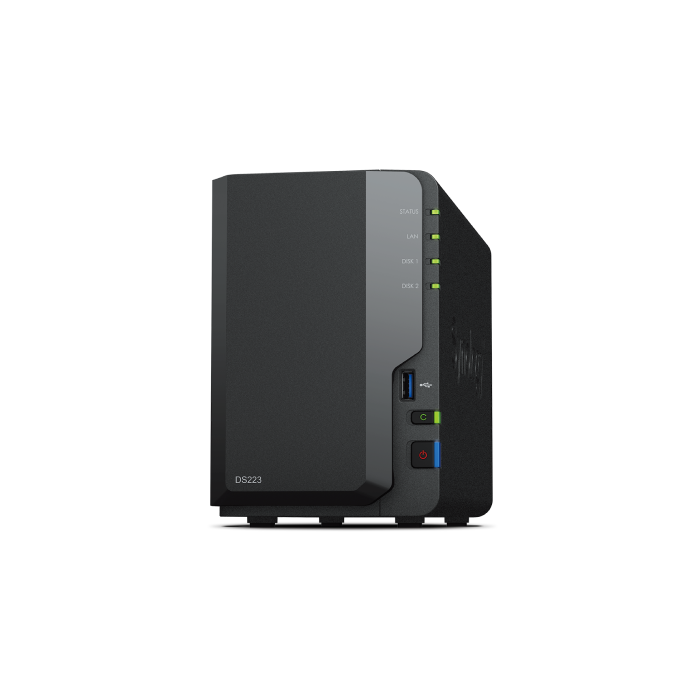
Synology DiskStation DS223
In stock
- SKU
- DS223
Description
Synology DiskStation DS223 NAS Server
The Synology DiskStation DS223 is a reliable 2-bay NAS server designed for home users, remote workers, and small businesses that need secure and centralized data storage. The Synology DiskStation DS223 combines dependable performance, simple management, and powerful data protection features through Synology DiskStation Manager (DSM), making it an ideal solution for file storage, backup, and private cloud access.
The Synology DiskStation DS223 is powered by a Realtek RTD1619B quad-core 1.7 GHz processor with 2 GB DDR4 memory, delivering smooth performance for everyday file sharing, multimedia streaming, and automated backup tasks. The Synology DiskStation DS223 supports multiple RAID configurations, allowing users to balance storage capacity with data protection according to their requirements.
Key Features of Synology DiskStation DS223
- Realtek RTD1619B quad-core 1.7 GHz processor.
- 2 GB DDR4 memory for reliable everyday performance.
- 2 hot-swappable SATA drive bays supporting 2.5-inch and 3.5-inch drives.
- Supports up to 36 TB total storage capacity with compatible drives.
- Compatible with Synology Hybrid RAID (SHR), RAID 0, RAID 1, and JBOD.
- Runs Synology DiskStation Manager (DSM) for intuitive storage management.
- Supports secure private cloud access from anywhere.
- Gigabit Ethernet connectivity for stable network performance.
- Three USB 3.2 Gen 1 ports for external storage and peripherals.
- Quiet operation with an efficient low-noise cooling fan.
Performance and Storage
The Synology DiskStation DS223 provides dependable performance for storing documents, photos, videos, and business files in one centralized location. The Synology DiskStation DS223 supports Btrfs and EXT4 file systems, helping improve data integrity, snapshot protection, and storage efficiency while maintaining excellent reliability for daily workloads.
Connectivity and Compatibility
The Synology DiskStation DS223 offers flexible connectivity with one Gigabit Ethernet port and three USB 3.2 Gen 1 ports for connecting external storage devices and accessories. The Synology DiskStation DS223 supports SMB, NFS, AFP, FTP, iSCSI, WebDAV, HTTP(S), VPN, and additional network protocols, ensuring compatibility across Windows, macOS, Linux, and mobile devices.
Ideal Applications
- Centralized file storage for homes and small offices.
- Private cloud storage with secure remote access.
- Automatic PC and mobile device backups.
- Photo and video library management.
- Media streaming across compatible devices.
- Secure document sharing and collaboration.
- Surveillance storage with compatible Synology applications.
Technical Specifications
- Processor: Realtek RTD1619B Quad-Core 1.7 GHz
- Memory: 2 GB DDR4 (Non-expandable)
- Drive Bays: 2 x SATA 2.5-inch / 3.5-inch (Hot-swappable)
- Maximum Storage Capacity: Up to 36 TB (2 x 18 TB)
- RAID Support: Synology Hybrid RAID (SHR), RAID 0, RAID 1, JBOD
- Network: 1 x Gigabit RJ-45 Ethernet Port
- USB Ports: 3 x USB 3.2 Gen 1 Type-A
- Internal File Systems: Btrfs, EXT4
- External File Systems: Btrfs, EXT3, EXT4, FAT32, NTFS, HFS+, exFAT
- Supported Protocols: SMB, AFP, NFS, FTP, iSCSI, WebDAV, CalDAV, HTTP(S), VPN
Why Choose Synology DiskStation DS223?
The Synology DiskStation DS223 delivers an excellent balance of performance, security, and ease of use for users looking to build a dependable private cloud or centralized storage system. With efficient hardware, flexible RAID options, comprehensive file sharing capabilities, and the powerful Synology DSM operating system, the Synology DiskStation DS223 is a cost-effective NAS solution for protecting valuable data while ensuring convenient access from anywhere.
More Information
| Smart Phone | No |
|---|